SPTA Framework: Parallel Processing in SAP
Introduction
Have you ever waited a long time for a process while developing an SAP program? Long processing times can occur when dealing with large data volumes, or when there are API calls to external systems for each record being processed. In this article, I will discuss the SPTA framework, an approach to performing parallel processing in SAP. This approach can reduce processing time from 9 seconds to just 1.5 seconds, a performance improvement of up to 6x!
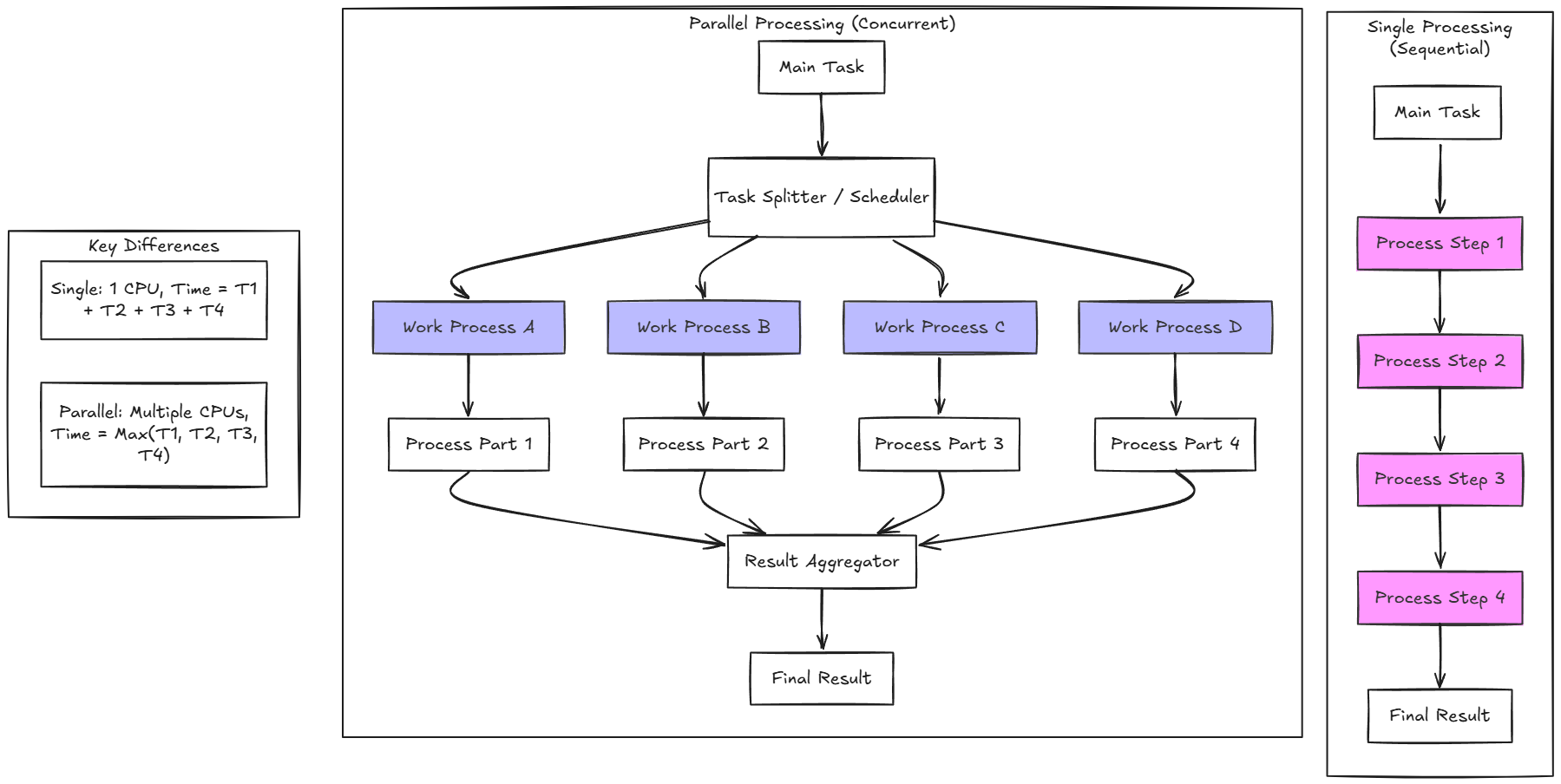
Single Processing vs Parallel Processing
The single processing approach handles tasks one by one for each piece of data. If there are ten pieces of data and each requires 1 second to process, then the total time needed is 10 seconds.
Conversely, parallel processing handles multiple tasks simultaneously. Data is divided into several chunks that are processed in parallel. After all tasks are completed, the results from each process are combined into a single final output. With this approach, overall processing time can be significantly reduced.
As an illustration: if ten pieces of data are divided into 5 parallel tasks (each handling 2 pieces of data), then the time required is only about 2 seconds—not 10 seconds as with the sequential approach.
Case Study
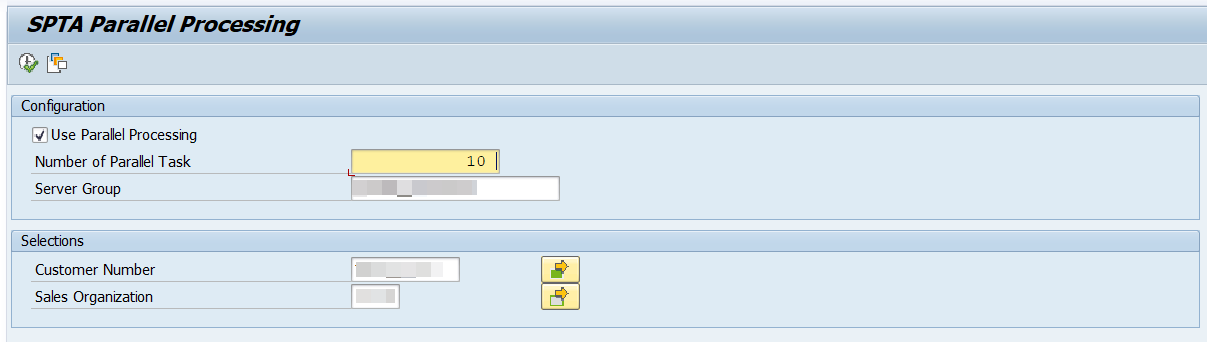
As a case study, I will create a report to display Sales Order data based on Customer Number and Sales Organization.
Scenario:
- User inputs 10 customer-sales organization combinations on the selection screen
- For each combination, the program calls BAPI_SALESORDER_GETLIST
- Each BAPI call takes ~0.9 seconds
- Sequential approach: 10 × 0.9s = ~9 seconds total
- Parallel approach (10 tasks): ~1.5 seconds total
By implementing SPTA parallel processing, we can run 10 BAPI calls simultaneously, resulting in a performance improvement of up to 6x.
Single Processing Result
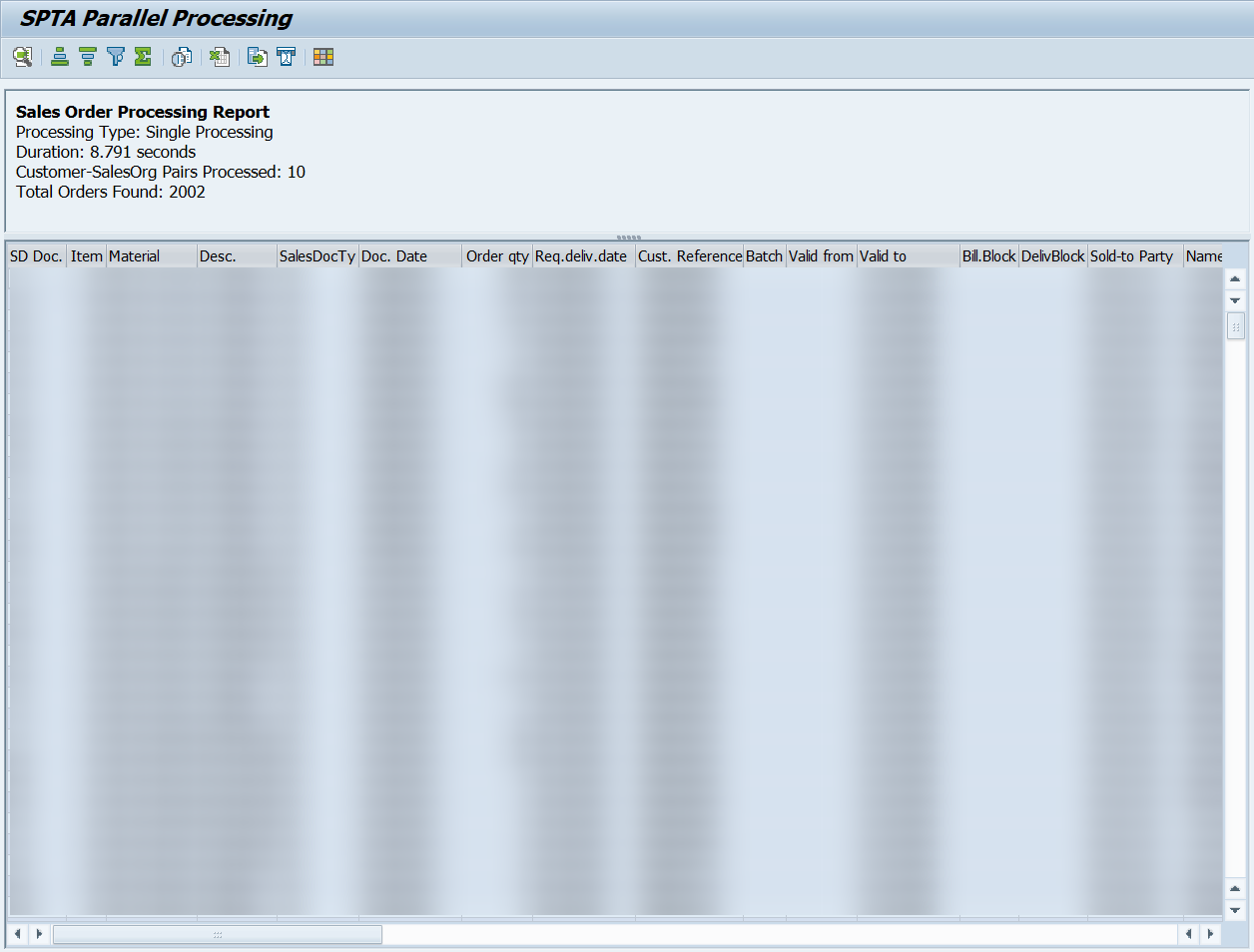
The image above shows the execution result with single processing. To process 10 customer-sales organization combinations, the program required 8.791 seconds and produced a total of 2,002 sales orders.
Parallel Processing Result
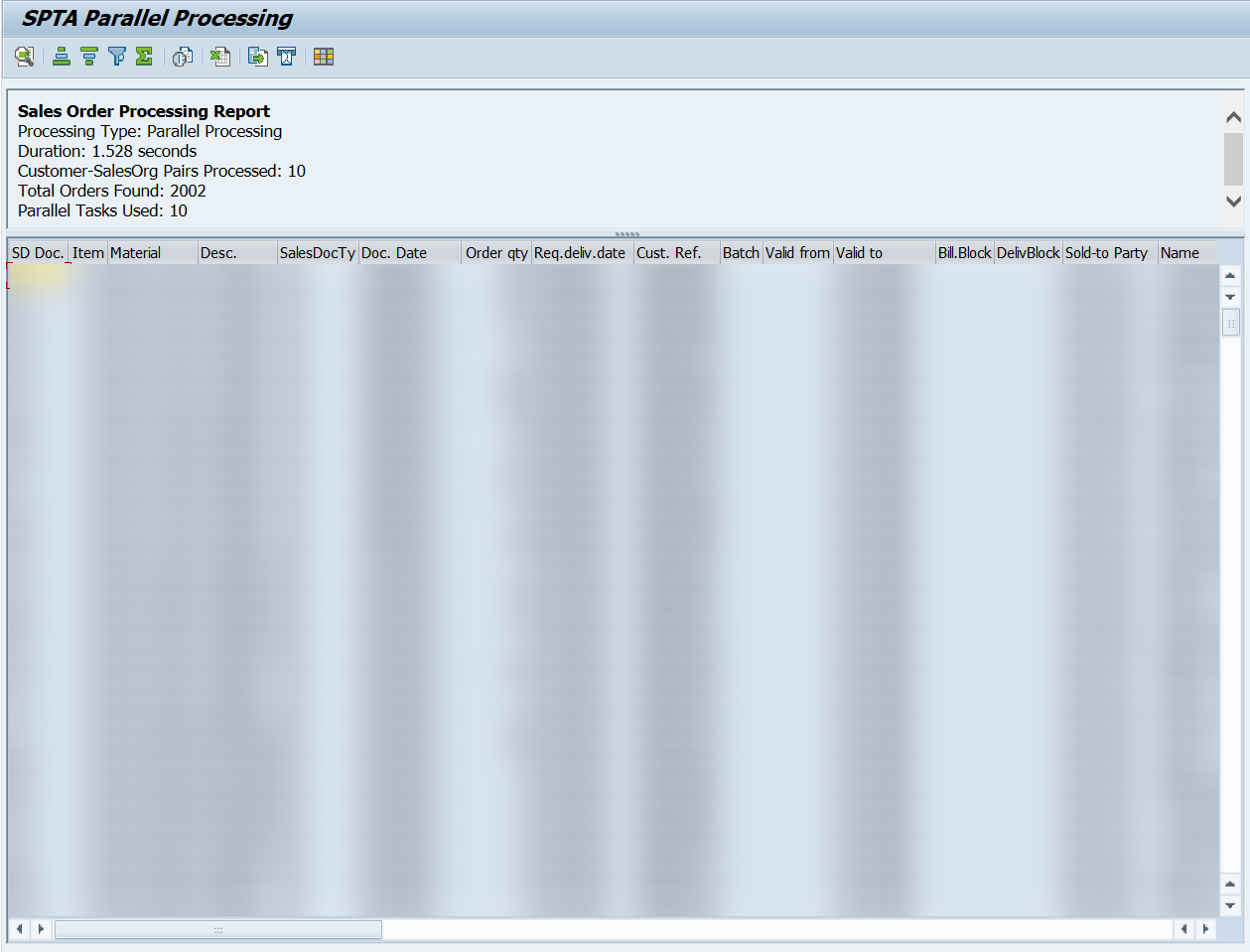
When using the parallel processing approach with 10 concurrent tasks, the same data can be processed in just 1.528 seconds. This means:
- Speedup: 5.76x faster
- Time saved: 7.26 seconds (82.6% reduction)
- Data integrity: Still produces the same 2,002 orders
These results demonstrate the effectiveness of parallel processing for operations that can be parallelized, such as multiple independent BAPI calls.
SPTA Framework Implementation
The SPTA framework is a framework for parallel processing in SAP. The implementation is quite straightforward, we just need to call FM SPTA_PARA_PROCESS_START_2 and pass the data we want to process along with three subroutine callbacks. The three subroutine callbacks are:
before_rfc_callback_form: Subroutine to split data into several chunksin_rfc_callback_form: Subroutine to process dataafter_rfc_callback_form: Subroutine to combine data
We also pass the server group name to specify which server group to use for parallel processing. You can find the server group in tcode RZ12. You can also optionally specify the maximum number of work processes in the max_no_of_tasks parameter.
Single Processing Code
First, I want to show the single processing code.
GET TIME STAMP FIELD ld_start_time.
x_proc_info-num_of_data_proc = lines( lt_anchor ).
x_proc_info-start_time = ld_start_time.

LOOP AT lt_anchor INTO lx_anchor.
  CLEAR: lt_salesorders[].

  CALL FUNCTION 'BAPI_SALESORDER_GETLIST'
    EXPORTING
      customer_number    = lx_anchor-kunnr
      sales_organization = lx_anchor-vkorg
    TABLES
      sales_orders       = lt_salesorders.

  IF lt_salesorders[] IS NOT INITIAL.
    LOOP AT lt_salesorders INTO DATA(lx_sales_order).
      APPEND lx_sales_order TO t_report.
    ENDLOOP.
    CLEAR: lx_sales_order.
  ELSE.
    " do nothing
  ENDIF.
ENDLOOP.
CLEAR lx_anchor.

GET TIME STAMP FIELD ld_end_time.
x_proc_info-end_time = ld_end_time.
x_proc_info-duration = ld_end_time - ld_start_time.
x_proc_info-processing_type = c_proctype-single.
For the single processing, I loop through each record and call BAPI BAPI_SALESORDER_GETLIST to get sales order data based on customer number and sales organization. Then I append the results to the report internal table.
Parallel Processing Code
Here is the parallel processing code.
GET TIME STAMP FIELD ld_start_time.
x_proc_info-num_of_data_proc = lines( lt_anchor ).
x_proc_info-start_time = ld_start_time.
t_tasks[] = lt_anchor[].

CALL FUNCTION 'SPTA_PARA_PROCESS_START_2'
  EXPORTING
    server_group             = p_srvgrp
    max_no_of_tasks          = p_numprc
    before_rfc_callback_form = 'F_BEFORE_PROC'
    in_rfc_callback_form     = 'F_IN'
    after_rfc_callback_form  = 'F_AFTER'
    callback_prog            = sy-repid
  EXCEPTIONS
    invalid_server_group     = 1
    no_resources_available   = 2
    OTHERS                   = 3.
IF sy-subrc <> 0.
  CASE sy-subrc.
    WHEN 1.
      ld_errmsg = 'Invalid server group'.
    WHEN 2.
      ld_errmsg = 'No resources available'.
    WHEN OTHERS.
      ld_errmsg = 'Failed start parallel processing.'.
  ENDCASE.
  m_set_error fc_d_err fc_d_errtype 'E' fc_d_errmsg ld_errmsg.
  RETURN.
ENDIF.

GET TIME STAMP FIELD ld_end_time.
x_proc_info-end_time = ld_end_time.
x_proc_info-duration = ld_end_time - ld_start_time.
x_proc_info-processing_type = c_proctype-parallel.
For the parallel processing, there is no loop in this process. We simply call FM SPTA_PARA_PROCESS_START_2 with the defined subroutine callbacks and other required parameters.
FORM f_before_proc
  USING    p_before_rfc_imp  TYPE spta_t_before_rfc_imp
  CHANGING p_before_rfc_exp  TYPE spta_t_before_rfc_exp
           p_rfcdata         TYPE spta_t_indxtab
           p_failed_objects  TYPE spta_t_failed_objects
           p_pending_objects TYPE spta_t_pending_objects
           p_user_param.

  DATA: lx_task TYPE ty_task.
  CLEAR: lx_task.

  IF t_tasks[] IS INITIAL.
    CLEAR p_before_rfc_exp-start_rfc.
    EXIT.
  ELSE.
    " do nothing
  ENDIF.

  READ TABLE t_tasks INDEX 1 INTO lx_task.
  IF sy-subrc NE 0 OR lx_task IS INITIAL.
    DELETE t_tasks INDEX 1.
    RETURN.
  ELSE.
    " do nothing
  ENDIF.
  DELETE t_tasks INDEX 1.

  p_before_rfc_exp-start_rfc = 'X'.
  CALL FUNCTION 'SPTA_INDX_PACKAGE_ENCODE'
    EXPORTING
      data    = lx_task
    IMPORTING
      indxtab = p_rfcdata.
ENDFORM.
The subroutine f_before_proc is called repeatedly by the SPTA framework to retrieve the next task to process. In this case, it takes one record from the internal table and passes it to the RFC data. The data will then be available in the next subroutine callback f_in.
FORM f_in
  USING    p_in_rfc_imp TYPE spta_t_in_rfc_imp
  CHANGING p_in_rfc_exp TYPE spta_t_in_rfc_exp
           p_rfcdata    TYPE spta_t_indxtab.

  DATA: lx_task        TYPE ty_task,
        lt_salesorders TYPE TABLE OF bapiorders,
        lx_result      TYPE ty_result.
  CLEAR: lx_task, lt_salesorders[], lx_result.

  CALL FUNCTION 'SPTA_INDX_PACKAGE_DECODE'
    EXPORTING
      indxtab = p_rfcdata
    IMPORTING
      data    = lx_task.

  CALL FUNCTION 'BAPI_SALESORDER_GETLIST'
    EXPORTING
      customer_number    = lx_task-kunnr
      sales_organization = lx_task-vkorg
    TABLES
      sales_orders       = lt_salesorders.

  lx_result-sales_orders = lt_salesorders[].
  CALL FUNCTION 'SPTA_INDX_PACKAGE_ENCODE'
    EXPORTING
      data    = lx_result
    IMPORTING
      indxtab = p_rfcdata.
ENDFORM.
The subroutine f_in is responsible for processing data. Here, it calls BAPI BAPI_SALESORDER_GETLIST to get sales order data based on customer number and sales organization. The result is then transferred to the next subroutine callback f_after.
FORM f_after
  USING    p_rfcdata         TYPE spta_t_indxtab
           p_rfcsubre        TYPE sy-subrc
           p_rfcmsg          TYPE spta_t_rfcmsg
           p_pending_objects TYPE spta_t_pending_objects
           p_after_rfc_imp   TYPE spta_t_after_rfc_imp
  CHANGING p_after_rfc_exp   TYPE spta_t_after_rfc_exp
           p_user_param.

  DATA: lx_result TYPE ty_result.
  CLEAR: lx_result.

  CALL FUNCTION 'SPTA_INDX_PACKAGE_DECODE'
    EXPORTING
      indxtab = p_rfcdata
    IMPORTING
      data    = lx_result.

  IF lx_result-sales_orders[] IS NOT INITIAL.
    LOOP AT lx_result-sales_orders INTO DATA(lx_sales_order).
      APPEND lx_sales_order TO t_report.
    ENDLOOP.
    CLEAR lx_sales_order.
  ELSE.
    " do nothing
  ENDIF.
ENDFORM.
The subroutine f_after is responsible for combining data from all the RFC calls. It appends the sales order data to the report internal table.
View complete source code
github.com/Rhtymn/abap-examples →
Conclusion
The SPTA framework is a powerful tool for parallel processing in SAP. It is easy to use and can significantly improve the performance of long-running reports. However, it is important to note that the SPTA framework is not a silver bullet. It is only effective for operations that can be parallelized, such as multiple independent BAPI calls. For operations that cannot be parallelized, the SPTA framework will not provide any performance benefits.