SAP OData Basics: CRUD with Z-Table
1. Introduction
If you’ve been working with SAP long enough, you’ve probably heard the term OData thrown around — especially when Fiori apps or API integrations are involved. But what exactly is it, and why does SAP use it?
What is OData?
OData (Open Data Protocol) is a REST-based protocol built on top of HTTP. It defines a standard way to expose and consume data via URLs, using JSON or XML as the data format. Think of it as a standardized REST API — you get a consistent way to do CRUD operations (Create, Read, Update, Delete) without having to design your own API contract from scratch.
In SAP, OData is the backbone of Fiori applications and is commonly used for integrations with external systems, mobile apps, and web frontends.
OData vs RFC/BAPI — When to Use Which?
A common question for ABAP developers is: when should I use OData instead of just calling an RFC or BAPI?
| RFC / BAPI | OData | |
|---|---|---|
| Protocol | SAP proprietary | HTTP / REST |
| Consumed by | ABAP, SAP systems | Any HTTP client |
| Best for | SAP-to-SAP integration | Fiori, web, mobile, external systems |
| Tooling | SAP GUI, SE37 | Browser, Postman, any REST client |
| Standard format | ABAP structures | JSON / XML |
In short — if your consumer is a Fiori app, web frontend, or external system, OData is the right choice. If you’re doing SAP-to-SAP calls, RFC/BAPI is still perfectly valid.
What We’ll Build
Throughout this blog, we’ll build a simple OData CRUD service from scratch using a custom Z-table. By the end, you’ll have a fully functional service that supports:
- Fetching all employees with filtering, sorting, and pagination
- Fetching a single employee by ID
- Creating a new employee with auto-generated ID
- Updating employee data
- Deleting an employee
Prerequisites
Before we start, make sure you have:
- Access to an SAP system with SAP Gateway enabled
- Basic ABAP knowledge (SELECT, INSERT, UPDATE, DELETE)
- Postman or access to
/IWFND/GW_CLIENTfor testing - Authorization to create objects in SE11, SEGW, and
/IWFND/MAINT_SERVICE
2. Setting Up the Z-Table in SE11
Before we can build the OData service, we need somewhere to store our data. We’ll create a custom database table in SE11.
Naming Conventions
A few things to know before we start:
- Table name must start with
Z(orY) — this marks it as a custom object, not a standard SAP object MANDT(client) is always the first key field in any SAP table — SAP uses this internally for client separation
Table Structure
Here’s the structure we’ll use for our ZMHRABDT000001 table:
| Field | Type | Length | Description |
|---|---|---|---|
MANDT | MANDT | 3 | Client (SAP standard) |
EMPID | NUMC | 10 | Employee ID |
ENAME | CHAR | 40 | Full Name |
POSIT | CHAR | 30 | Position / Job Title |
DEPTM | CHAR | 20 | Department |
SALRY | CURR | 15,2 | Salary Amount |
WAERS | WAERS | 5 | Currency Key |
DOJDT | DATS | 8 | Date of Joining |
STATS | CHAR | 1 | Status (A=Active, I=Inactive) |
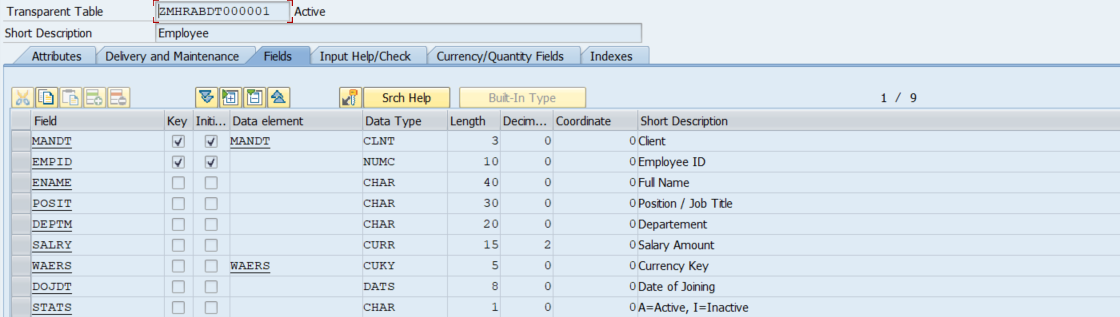
Why Does SALRY Need a Currency Key?
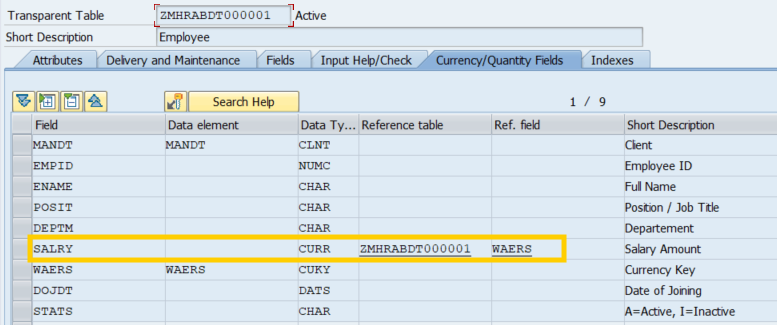
SAP requires every CURR type field to be paired with a currency key field in the same table. This is because currency amounts are meaningless without knowing which currency they’re in. If you skip this step, SE11 will throw an error when you try to activate the table.
To link them, go to the Currency/Quantity Fields tab and set:
- Field:
SALRY - Ref. Field:
WAERS - Ref. Table:
ZMHRABDT000001
3. Creating the OData Project in SEGW
With the Z-table ready, we can now create the OData service. SAP provides SEGW (SAP Gateway Service Builder) as the central tool for building and managing OData services.
Creating a New Project
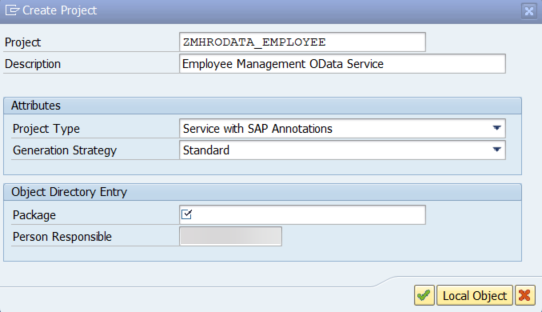
Open transaction SEGW and click Create Project. Fill in the details:
| Field | Value |
|---|---|
| Project | ZMHRODATA_EMPLOYEE |
| Description | Employee Management OData Service |
| Project Type | Service with SAP Annotations |
Defining the Entity Type Manually
Right-click Data Model → Create → Entity Type. Set the Entity Type name to employee.
Then define each property manually under the entity type:
| Property Name | ABAP Field Name | EDM Type | Max Length | Nullable | Notes |
|---|---|---|---|---|---|
employeeID | EMPID | Edm.String | 10 | false | Key field |
employeeName | ENAME | Edm.String | 40 | false | |
position | POSIT | Edm.String | 30 | false | |
department | DEPTM | Edm.String | 20 | false | |
salary | SALRY | Edm.Decimal | false | Precision 15, Scale 2 | |
currency | WAERS | Edm.String | 5 | false | |
dateOfJoining | DOJDT | Edm.DateTime | false | ||
status | STATS | Edm.String | 1 | false |
A few things to note:
EMPIDis typeEdm.Stringdespite being a numeric field — this is because ABAP’sNUMCtype stores leading zeros, which would be lost if mapped toEdm.IntSALRYusesEdm.Decimalbecause it has decimal placesDOJDTusesEdm.DateTimewhich maps to ABAP’sDATS
Set employeeID as the key property by right-clicking it → Set as Key.

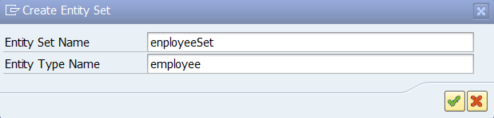
Creating the Entity Set
Right-click Entity Sets → Create. Set:
| Field | Value |
|---|---|
| Entity Set Name | employeeSet |
| Entity Type | employee |
Understanding MPC and DPC Classes
After the model is defined, click Generate — the button looks like this:

SEGW will generate four classes:
| Class | Purpose |
|---|---|
MPC | Model Provider Class — defines the metadata |
MPC_EXT | Extension of MPC — where you customize the model |
DPC | Data Provider Class — base class, don’t touch |
DPC_EXT | Extension of DPC — where you implement all CRUD logic |

The rule is simple: never edit MPC or DPC directly — always work in MPC_EXT and DPC_EXT. The base classes get regenerated every time you hit Generate in SEGW, which would overwrite your changes.
Registering the Service
Generating the service doesn’t make it accessible yet. You need to register the service in the Gateway:
- Open /IWFND/MAINT_SERVICE
- Click Add Service
- Set System Alias to
LOCAL - Search for
ZMHRODATA_EMPLOYEE_SRV→ select it → Add Selected Services - Confirm with OK

If the service doesn’t appear in the search, check /IWBEP/REG_SERVICE to verify it’s registered on the backend side first.
Verifying via $metadata
Once registered, verify the service is working by accessing the $metadata endpoint. You can use transaction /IWFND/GW_CLIENT directly from SAP GUI — set the HTTP method to GET and enter the URI:
/sap/opu/odata/sap/ZMHRODATA_EMPLOYEE_SRV/$metadataYou should see an XML response describing your Entity Type, properties, and Entity Set:

If this works, the service is up and ready — now we can start implementing the actual CRUD logic.
4. Implementing CRUD Operations in DPC_EXT
All CRUD logic lives in DPC_EXT. Open it via SE24 and redefine the following methods:
| Method | Operation |
|---|---|
EMPLOYEESET_GET_ENTITYSET | GET all employees |
EMPLOYEESET_GET_ENTITY | GET single employee |
EMPLOYEESET_CREATE_ENTITY | POST new employee |
EMPLOYEESET_UPDATE_ENTITY | PUT update employee |
EMPLOYEESET_DELETE_ENTITY | DELETE employee |
GET_ENTITYSET — Fetch All Employees
This method handles GET /employeeSet with support for filtering, sorting, and pagination.
METHOD employeeset_get_entityset.
  DATA: lt_employee       TYPE TABLE OF zmhrabdt000001,
        ld_date           TYPE dats,
        ld_ts             TYPE timestamp,
        lx_entity         LIKE LINE OF et_entityset,
        lt_order          TYPE /iwbep/t_mgw_tech_order,
        lx_sort           TYPE abap_sortorder,
        lt_sort           TYPE abap_sortorder_tab,
        lx_filter_selopts LIKE LINE OF it_filter_select_options,
        lr_empid          TYPE RANGE OF zmhrabdt000001-empid,
        lr_ename          TYPE RANGE OF zmhrabdt000001-ename,
        lr_posit          TYPE RANGE OF zmhrabdt000001-posit,
        lr_deptm          TYPE RANGE OF zmhrabdt000001-deptm,
        lr_salry          TYPE RANGE OF zmhrabdt000001-salry,
        lr_waers          TYPE RANGE OF zmhrabdt000001-waers,
        lr_dojdt          TYPE RANGE OF zmhrabdt000001-dojdt,
        lx_dojdt          LIKE LINE OF lr_dojdt,
        lr_stat           TYPE RANGE OF zmhrabdt000001-stats.
  FIELD-SYMBOLS: <lfs_select_option> TYPE /iwbep/s_cod_select_option,
                 <lfs_filter_selopt> LIKE LINE OF it_filter_select_options.

*& Build filter ranges from $filter query option
  LOOP AT it_filter_select_options ASSIGNING <lfs_filter_selopt>.
    IF <lfs_filter_selopt>-select_options[] IS NOT INITIAL.
      LOOP AT <lfs_filter_selopt>-select_options ASSIGNING <lfs_select_option>.
        CASE <lfs_filter_selopt>-property.
          WHEN 'employeeID'.
            APPEND VALUE #( sign = <lfs_select_option>-sign option = <lfs_select_option>-option
                            low  = <lfs_select_option>-low  high   = <lfs_select_option>-high ) TO lr_empid.
          WHEN 'employeeName'.
            APPEND VALUE #( sign = <lfs_select_option>-sign option = <lfs_select_option>-option
                            low  = <lfs_select_option>-low  high   = <lfs_select_option>-high ) TO lr_ename.
          WHEN 'position'.
            APPEND VALUE #( sign = <lfs_select_option>-sign option = <lfs_select_option>-option
                            low  = <lfs_select_option>-low  high   = <lfs_select_option>-high ) TO lr_posit.
          WHEN 'department'.
            APPEND VALUE #( sign = <lfs_select_option>-sign option = <lfs_select_option>-option
                            low  = <lfs_select_option>-low  high   = <lfs_select_option>-high ) TO lr_deptm.
          WHEN 'salary'.
            DATA: ld_low_int  TYPE p DECIMALS 2,
                  ld_high_int TYPE p DECIMALS 2.
            CALL FUNCTION 'CURRENCY_AMOUNT_DISPLAY_TO_SAP'
              EXPORTING currency        = 'IDR'
                        amount_display  = <lfs_select_option>-low
              IMPORTING amount_internal = ld_low_int
              EXCEPTIONS OTHERS         = 0.
            IF <lfs_select_option>-high IS NOT INITIAL.
              CALL FUNCTION 'CURRENCY_AMOUNT_DISPLAY_TO_SAP'
                EXPORTING currency        = 'IDR'
                          amount_display  = <lfs_select_option>-high
                IMPORTING amount_internal = ld_high_int
                EXCEPTIONS OTHERS         = 0.
            ENDIF.
            APPEND VALUE #( sign   = <lfs_select_option>-sign
                            option = <lfs_select_option>-option
                            low    = ld_low_int
                            high   = ld_high_int ) TO lr_salry.
          WHEN 'currency'.
            APPEND VALUE #( sign = <lfs_select_option>-sign option = <lfs_select_option>-option
                            low  = <lfs_select_option>-low  high   = <lfs_select_option>-high ) TO lr_waers.
          WHEN 'dateOfJoining'.
            CLEAR: ld_ts, ld_date, lx_dojdt.
            lx_dojdt-sign   = <lfs_select_option>-sign.
            lx_dojdt-option = <lfs_select_option>-option.
            ld_ts = <lfs_select_option>-low.
            CONVERT TIME STAMP ld_ts TIME ZONE 'UTC' INTO DATE ld_date.
            lx_dojdt-low = ld_date.
            IF <lfs_select_option>-high IS NOT INITIAL.
              CLEAR: ld_ts, ld_date.
              ld_ts = <lfs_select_option>-high.
              CONVERT TIME STAMP ld_ts TIME ZONE 'UTC' INTO DATE ld_date.
              lx_dojdt-high = ld_date.
            ENDIF.
            APPEND lx_dojdt TO lr_dojdt.
          WHEN 'status'.
            APPEND VALUE #( sign = <lfs_select_option>-sign option = <lfs_select_option>-option
                            low  = <lfs_select_option>-low  high   = <lfs_select_option>-high ) TO lr_stat.
          WHEN OTHERS.
            " do nothing
        ENDCASE.
      ENDLOOP.
    ENDIF.
  ENDLOOP.

*& Build sort table from $orderby query option
  lt_order = io_tech_request_context->get_orderby( ).
  LOOP AT lt_order ASSIGNING FIELD-SYMBOL(<lfs_order>).
    CLEAR lx_sort.
    lx_sort-name = <lfs_order>-property.
    IF <lfs_order>-order EQ 'desc'.
      lx_sort-descending = abap_true.
    ENDIF.
    APPEND lx_sort TO lt_sort.
  ENDLOOP.

*& Fetch data
  SELECT * FROM zmhrabdt000001
    INTO TABLE @lt_employee
    WHERE empid IN @lr_empid
      AND ename IN @lr_ename
      AND posit IN @lr_posit
      AND deptm IN @lr_deptm
      AND salry IN @lr_salry
      AND waers IN @lr_waers
      AND dojdt IN @lr_dojdt
      AND stats IN @lr_stat.

  IF sy-subrc NE 0 OR lt_employee[] IS INITIAL.
    RETURN.  " return 200 with empty result
  ENDIF.

*& Convert DATS to timestamp for each record
  LOOP AT lt_employee ASSIGNING FIELD-SYMBOL(<lfs_employee>).
    CLEAR: lx_entity, ld_date, ld_ts.
    ld_date = <lfs_employee>-dojdt.
    MOVE-CORRESPONDING <lfs_employee> TO lx_entity.
    CONVERT DATE ld_date TIME '000000'
      INTO TIME STAMP ld_ts TIME ZONE 'UTC'.
    lx_entity-dojdt = ld_ts.
    APPEND lx_entity TO et_entityset.
  ENDLOOP.

*& Apply sort
  IF lt_sort[] IS NOT INITIAL.
    SORT et_entityset BY (lt_sort).
  ENDIF.

*& Inline count
  IF io_tech_request_context->has_inlinecount( ) EQ abap_true.
    DESCRIBE TABLE et_entityset LINES es_response_context-inlinecount.
  ENDIF.

*& Apply pagination
  CALL METHOD /iwbep/cl_mgw_data_util=>paging
    EXPORTING is_paging = is_paging
    CHANGING  ct_data   = et_entityset.
ENDMETHOD.
GET_ENTITY — Fetch Single Employee
This method handles GET /employeeSet('0000000001').
METHOD employeeset_get_entity.
  DATA: lx_key_tab    LIKE LINE OF it_key_tab,
        ld_employeeid TYPE zmhrabdt000001-empid,
        lx_z001       TYPE zmhrabdt000001,
        lo_msg        TYPE REF TO /iwbep/if_message_container,
        ld_date       TYPE dats,
        ld_ts         TYPE timestamp.

  lo_msg = mo_context->get_message_container( ).

*& Extract key from URL
  READ TABLE it_key_tab WITH KEY name = 'employeeID' INTO lx_key_tab.
  IF sy-subrc EQ 0.
    ld_employeeid = lx_key_tab-value.
  ENDIF.

*& Fetch data
  SELECT SINGLE * FROM zmhrabdt000001
    WHERE empid EQ @ld_employeeid
    INTO @lx_z001.

  IF sy-subrc NE 0 OR lx_z001 IS INITIAL.
    lo_msg->add_message_text_only(
      iv_msg_type = /iwbep/cl_cos_logger=>error
      iv_msg_text = 'No data found.' ).
    RAISE EXCEPTION TYPE /iwbep/cx_mgw_busi_exception
      EXPORTING message_container = lo_msg http_status_code = 404.
  ENDIF.

*& Convert DATS to timestamp
  ld_date = lx_z001-dojdt.
  CONVERT DATE ld_date TIME '000000'
    INTO TIME STAMP ld_ts TIME ZONE 'UTC'.

*& Set response
  MOVE-CORRESPONDING lx_z001 TO er_entity.
  er_entity-dojdt = ld_ts.
ENDMETHOD.
CREATE_ENTITY — Add New Employee
This method handles POST /employeeSet. A few things happen here beyond a simple INSERT:
- Employee ID is auto-generated via
SELECT MAX— the client should not send it - Status is hardcoded to
'A'on creation — the client should not send it either - Salary is converted using
CURRENCY_AMOUNT_DISPLAY_TO_SAPto handle implicit decimals - Date is converted from OData timestamp to ABAP
DATS - Currency is validated against the
TCURCtable
METHOD employeeset_create_entity.
  DATA: lx_entity     LIKE er_entity,
        lo_msg        TYPE REF TO /iwbep/if_message_container,
        lx_z001       TYPE zmhrabdt000001,
        ld_timestamp  TYPE timestamp,
        ld_date       TYPE dats,
        ld_time       TYPE tims,
        ld_latest_id  TYPE zmhrabdt000001-empid,
        ld_exist      TYPE abap_bool,
        ld_waers      TYPE tcurc-waers,
        ld_amount_in  TYPE wmto_s-amount,
        ld_amount_out TYPE p DECIMALS 2.

  lo_msg = mo_context->get_message_container( ).

*& Read request body
  TRY.
      io_data_provider->read_entry_data( IMPORTING es_data = lx_entity ).
    CATCH /iwbep/cx_mgw_tech_exception.
      lo_msg->add_message_text_only( iv_msg_type = /iwbep/cl_cos_logger=>error
                                     iv_msg_text = 'Internal Server Error' ).
      RAISE EXCEPTION TYPE /iwbep/cx_mgw_busi_exception
        EXPORTING message_container = lo_msg http_status_code = 500.
  ENDTRY.

*& Validations
  " mandatory fields
  IF lx_entity-ename IS INITIAL OR lx_entity-posit IS INITIAL OR lx_entity-deptm IS INITIAL
    OR lx_entity-salry IS INITIAL OR lx_entity-waers IS INITIAL OR lx_entity-dojdt IS INITIAL.
    lo_msg->add_message_text_only( iv_msg_type = /iwbep/cl_cos_logger=>error
      iv_msg_text = 'employeeName, position, department, salary, currency, and dateOfJoining are mandatory.' ).
    RAISE EXCEPTION TYPE /iwbep/cx_mgw_busi_exception
      EXPORTING message_container = lo_msg http_status_code = 400.
  ENDIF.

  " employeeID and status should not be sent by client
  IF lx_entity-empid IS NOT INITIAL.
    lo_msg->add_message_text_only( iv_msg_type = /iwbep/cl_cos_logger=>error
      iv_msg_text = 'employeeID should not be defined.' ).
    RAISE EXCEPTION TYPE /iwbep/cx_mgw_busi_exception
      EXPORTING message_container = lo_msg http_status_code = 400.
  ENDIF.

  IF lx_entity-stats IS NOT INITIAL.
    lo_msg->add_message_text_only( iv_msg_type = /iwbep/cl_cos_logger=>error
      iv_msg_text = 'status should not be defined.' ).
    RAISE EXCEPTION TYPE /iwbep/cx_mgw_busi_exception
      EXPORTING message_container = lo_msg http_status_code = 400.
  ENDIF.

  " validate currency against TCURC
  ld_waers = lx_entity-waers.
  SELECT SINGLE @abap_true FROM tcurc WHERE waers EQ @ld_waers INTO @ld_exist.
  IF sy-subrc NE 0 OR ld_exist IS INITIAL.
    lo_msg->add_message_text_only( iv_msg_type = /iwbep/cl_cos_logger=>error
      iv_msg_text = 'Invalid currency.' ).
    RAISE EXCEPTION TYPE /iwbep/cx_mgw_busi_exception
      EXPORTING message_container = lo_msg http_status_code = 400.
  ENDIF.

*& Convert timestamp to DATS
  ld_timestamp = lx_entity-dojdt.
  CONVERT TIME STAMP ld_timestamp TIME ZONE 'UTC'
    INTO DATE ld_date TIME ld_time.

*& Convert salary amount
  ld_amount_in = lx_entity-salry.
  CALL FUNCTION 'CURRENCY_AMOUNT_DISPLAY_TO_SAP'
    EXPORTING currency        = ld_waers amount_display  = ld_amount_in
    IMPORTING amount_internal = ld_amount_out
    EXCEPTIONS internal_error = 1 OTHERS = 2.
  IF sy-subrc <> 0.
    lo_msg->add_message_text_only( iv_msg_type = /iwbep/cl_cos_logger=>error
      iv_msg_text = 'Failed converting salary.' ).
    RAISE EXCEPTION TYPE /iwbep/cx_mgw_busi_exception
      EXPORTING message_container = lo_msg http_status_code = 500.
  ENDIF.
  lx_entity-salry = ld_amount_out.

*& Auto-generate employee ID
  SELECT MAX( empid ) FROM zmhrabdt000001 INTO @ld_latest_id.

*& Build and insert record
  lx_entity-empid = lx_z001-empid = 1 + ld_latest_id.
  lx_z001-ename = lx_entity-ename.
  lx_z001-posit = lx_entity-posit.
  lx_z001-deptm = lx_entity-deptm.
  lx_z001-salry = lx_entity-salry.
  lx_z001-waers = lx_entity-waers.
  lx_z001-dojdt = ld_date.
  lx_z001-stats = 'A'.

  TRY.
      INSERT zmhrabdt000001 FROM lx_z001.
      IF sy-subrc NE 0.
        lo_msg->add_message_text_only( iv_msg_type = /iwbep/cl_cos_logger=>error
          iv_msg_text = 'Failed to insert data.' ).
        RAISE EXCEPTION TYPE /iwbep/cx_mgw_busi_exception
          EXPORTING message_container = lo_msg http_status_code = 500.
      ENDIF.
    CATCH cx_root.
      lo_msg->add_message_text_only( iv_msg_type = /iwbep/cl_cos_logger=>error
        iv_msg_text = 'Failed to insert data.' ).
      RAISE EXCEPTION TYPE /iwbep/cx_mgw_busi_exception
        EXPORTING message_container = lo_msg http_status_code = 500.
  ENDTRY.

*& Set response
  MOVE-CORRESPONDING lx_z001 TO er_entity.
  CLEAR ld_timestamp.
  CONVERT DATE ld_date TIME '000000'
    INTO TIME STAMP ld_timestamp TIME ZONE 'UTC'.
  er_entity-dojdt = ld_timestamp.
ENDMETHOD.
SELECT MAX for ID generation can cause a race condition — two concurrent requests may read the same MAX and generate duplicate keys. For production, use a Number Range Object (SNRO) with NUMBER_GET_NEXT instead.
UPDATE_ENTITY — Update Employee Data
This method handles PUT /employeeSet('0000000001'). Note that only employeeName, position, department, and status can be updated — employeeID, salary, currency, and dateOfJoining are locked after creation.
METHOD employeeset_update_entity.
  DATA: lx_entity     LIKE er_entity,
        lo_msg        TYPE REF TO /iwbep/if_message_container,
        lx_z001       TYPE zmhrabdt000001,
        lx_key_tab    LIKE LINE OF it_key_tab,
        ld_employeeid TYPE zmhrabdt000001-empid.

  lo_msg = mo_context->get_message_container( ).

*& Extract key from URL
  READ TABLE it_key_tab WITH KEY name = 'employeeID' INTO lx_key_tab.
  IF sy-subrc EQ 0.
    ld_employeeid = lx_key_tab-value.
  ENDIF.

*& Read request body
  TRY.
      io_data_provider->read_entry_data( IMPORTING es_data = lx_entity ).
    CATCH /iwbep/cx_mgw_tech_exception.
      lo_msg->add_message_text_only( iv_msg_type = /iwbep/cl_cos_logger=>error
                                     iv_msg_text = 'Internal Server Error' ).
      RAISE EXCEPTION TYPE /iwbep/cx_mgw_busi_exception
        EXPORTING message_container = lo_msg http_status_code = 500.
  ENDTRY.

*& Validations
  IF lx_entity-ename IS INITIAL OR lx_entity-posit IS INITIAL
    OR lx_entity-deptm IS INITIAL OR lx_entity-stats IS INITIAL.
    lo_msg->add_message_text_only( iv_msg_type = /iwbep/cl_cos_logger=>error
      iv_msg_text = 'employeeName, position, department, and status are mandatory.' ).
    RAISE EXCEPTION TYPE /iwbep/cx_mgw_busi_exception
      EXPORTING message_container = lo_msg http_status_code = 400.
  ENDIF.

  IF lx_entity-stats NE 'A' AND lx_entity-stats NE 'I'.
    lo_msg->add_message_text_only( iv_msg_type = /iwbep/cl_cos_logger=>error
      iv_msg_text = 'status value must be ''A'' or ''I''.' ).
    RAISE EXCEPTION TYPE /iwbep/cx_mgw_busi_exception
      EXPORTING message_container = lo_msg http_status_code = 400.
  ENDIF.

  IF lx_entity-salry IS NOT INITIAL OR lx_entity-waers IS NOT INITIAL
    OR lx_entity-dojdt IS NOT INITIAL OR lx_entity-empid IS NOT INITIAL.
    lo_msg->add_message_text_only( iv_msg_type = /iwbep/cl_cos_logger=>error
      iv_msg_text = 'employeeID, salary, currency, and dateOfJoining cannot be updated.' ).
    RAISE EXCEPTION TYPE /iwbep/cx_mgw_busi_exception
      EXPORTING message_container = lo_msg http_status_code = 400.
  ENDIF.

*& Check data exists
  SELECT SINGLE * FROM zmhrabdt000001
    WHERE empid EQ @ld_employeeid INTO @lx_z001.
  IF sy-subrc NE 0 OR lx_z001 IS INITIAL.
    lo_msg->add_message_text_only( iv_msg_type = /iwbep/cl_cos_logger=>error
      iv_msg_text = 'No data found.' ).
    RAISE EXCEPTION TYPE /iwbep/cx_mgw_busi_exception
      EXPORTING message_container = lo_msg http_status_code = 404.
  ENDIF.

*& Update only allowed fields
  lx_z001-ename = lx_entity-ename.
  lx_z001-posit = lx_entity-posit.
  lx_z001-deptm = lx_entity-deptm.
  lx_z001-stats = lx_entity-stats.

  TRY.
      UPDATE zmhrabdt000001 FROM lx_z001.
      IF sy-subrc NE 0.
        lo_msg->add_message_text_only( iv_msg_type = /iwbep/cl_cos_logger=>error
          iv_msg_text = 'Failed to update data.' ).
        RAISE EXCEPTION TYPE /iwbep/cx_mgw_busi_exception
          EXPORTING message_container = lo_msg http_status_code = 500.
      ENDIF.
    CATCH cx_root.
      lo_msg->add_message_text_only( iv_msg_type = /iwbep/cl_cos_logger=>error
        iv_msg_text = 'Failed to update data.' ).
      RAISE EXCEPTION TYPE /iwbep/cx_mgw_busi_exception
        EXPORTING message_container = lo_msg http_status_code = 500.
  ENDTRY.
ENDMETHOD.
DELETE_ENTITY — Delete Employee
This method handles DELETE /employeeSet('0000000001'). We do an existence check first and return 404 before attempting the delete.
METHOD employeeset_delete_entity.
  DATA: lo_msg        TYPE REF TO /iwbep/if_message_container,
        lx_key_tab    LIKE LINE OF it_key_tab,
        ld_employeeid TYPE zmhrabdt000001-empid,
        ld_exist      TYPE abap_bool.

  lo_msg = mo_context->get_message_container( ).

*& Extract key from URL
  READ TABLE it_key_tab WITH KEY name = 'employeeID' INTO lx_key_tab.
  IF sy-subrc EQ 0.
    ld_employeeid = lx_key_tab-value.
  ENDIF.

*& Check data exists
  SELECT SINGLE @abap_true FROM zmhrabdt000001
    WHERE empid EQ @ld_employeeid INTO @ld_exist.
  IF sy-subrc NE 0 OR ld_exist IS INITIAL.
    lo_msg->add_message_text_only( iv_msg_type = /iwbep/cl_cos_logger=>error
      iv_msg_text = 'No data found.' ).
    RAISE EXCEPTION TYPE /iwbep/cx_mgw_busi_exception
      EXPORTING message_container = lo_msg http_status_code = 404.
  ENDIF.

*& Delete
  TRY.
      DELETE FROM zmhrabdt000001 WHERE empid EQ @ld_employeeid.
      IF sy-subrc NE 0.
        lo_msg->add_message_text_only( iv_msg_type = /iwbep/cl_cos_logger=>error
          iv_msg_text = 'Failed to delete data.' ).
        RAISE EXCEPTION TYPE /iwbep/cx_mgw_busi_exception
          EXPORTING message_container = lo_msg http_status_code = 500.
      ENDIF.
    CATCH cx_root.
      lo_msg->add_message_text_only( iv_msg_type = /iwbep/cl_cos_logger=>error
        iv_msg_text = 'Failed to delete data.' ).
      RAISE EXCEPTION TYPE /iwbep/cx_mgw_busi_exception
        EXPORTING message_container = lo_msg http_status_code = 500.
  ENDTRY.
ENDMETHOD.
5. Data Type Conversions — The Tricky Parts
One of the most common sources of confusion when building SAP OData services is data type conversion. ABAP and OData have different type systems, and some mappings are not as straightforward as they look.
NUMC → Edm.String
It might seem intuitive to map a numeric field to Edm.Int, but NUMC in ABAP is actually a character type that just happens to contain numbers. The key difference is that NUMC preserves leading zeros — 0000000001 stays 0000000001. If you map it to Edm.Int32, the leading zeros are stripped and your employee ID becomes just 1.
Always map NUMC to Edm.String and send it as a string in your JSON payload:
{
  "employeeID": "0000000001"
}
DATS ↔ Edm.DateTime
ABAP stores dates as DATS in YYYYMMDD format. OData represents dates as milliseconds since Unix epoch (January 1, 1970). The conversion needs to happen in both directions.
In request body (POST/PUT), dates are sent as:
{
  "dateOfJoining": "/Date(1640995200000)/"
}
In $filter, the format is different:
$filter=dateOfJoining eq datetime'2022-01-01T00:00:00'
$filter=dateOfJoining ge datetime'2022-01-01T00:00:00' and dateOfJoining le datetime'2022-12-31T00:00:00'
Converting in ABAP — DATS to timestamp (for GET response):
DATA: ld_date TYPE dats,
      ld_ts   TYPE timestamp.

ld_date = lx_z001-dojdt.
CONVERT DATE ld_date TIME '000000'
  INTO TIME STAMP ld_ts TIME ZONE 'UTC'.

er_entity-dojdt = ld_ts.
Converting in ABAP — timestamp to DATS (for CREATE):
DATA: ld_timestamp TYPE timestamp,
      ld_date      TYPE dats,
      ld_time      TYPE tims.

ld_timestamp = lx_entity-dojdt.
CONVERT TIME STAMP ld_timestamp TIME ZONE 'UTC'
  INTO DATE ld_date TIME ld_time.

lx_z001-dojdt = ld_date.
Converting in ABAP — timestamp to DATS (for $filter in GET_ENTITYSET):
When a client filters by dateOfJoining, OData parses the datetime'...' string and passes it into it_filter_select_options as a timestamp value — not a DATS string. If you append that raw value directly into lr_dojdt (a range of DATS), the comparison against the ABAP table will silently fail or produce wrong results.
The fix is to convert each low/high value from timestamp to DATS before building the range:
DATA: ld_ts    TYPE timestamp,
      ld_date  TYPE dats,
      lx_dojdt LIKE LINE OF lr_dojdt.

CLEAR: ld_ts, ld_date, lx_dojdt.
lx_dojdt-sign   = <lfs_select_option>-sign.
lx_dojdt-option = <lfs_select_option>-option.

ld_ts = <lfs_select_option>-low.
CONVERT TIME STAMP ld_ts TIME ZONE 'UTC' INTO DATE ld_date.
lx_dojdt-low = ld_date.

IF <lfs_select_option>-high IS NOT INITIAL.
  CLEAR: ld_ts, ld_date.
  ld_ts = <lfs_select_option>-high.
  CONVERT TIME STAMP ld_ts TIME ZONE 'UTC' INTO DATE ld_date.
  lx_dojdt-high = ld_date.
ENDIF.

APPEND lx_dojdt TO lr_dojdt.
CURR → Edm.Decimal
This one catches a lot of people off guard. SAP stores CURR fields with implicit decimal places based on the currency. For IDR (which has 2 decimal places), if the client sends a salary of 150000.00 (meaning 150,000 IDR), SAP expects to store 15000000 internally — the 2 decimal places are implicit.
This means if you insert the display value 150000 directly without conversion, SAP will store it as 15000000 but interpret it as 1,500.00 — a factor of 100 off from what you intended.
The fix is to use the standard function module CURRENCY_AMOUNT_DISPLAY_TO_SAP before inserting:
DATA: ld_amount_in  TYPE wmto_s-amount,
      ld_amount_out TYPE p DECIMALS 2.

ld_amount_in = lx_entity-salry.

CALL FUNCTION 'CURRENCY_AMOUNT_DISPLAY_TO_SAP'
  EXPORTING
    currency        = ld_waers
    amount_display  = ld_amount_in
  IMPORTING
    amount_internal = ld_amount_out
  EXCEPTIONS
    internal_error  = 1
    OTHERS          = 2.

lx_z001-salry = ld_amount_out.
6. Testing the Service
Testing via /IWFND/GW_CLIENT
The easiest way to test without any external tools. Open /IWFND/GW_CLIENT directly from SAP GUI:
- Enter the request URI
- Select the HTTP method
- For write operations, add request headers manually
- Click Execute
Start by verifying $metadata loads correctly, then test each operation one by one.
Get Entity Set
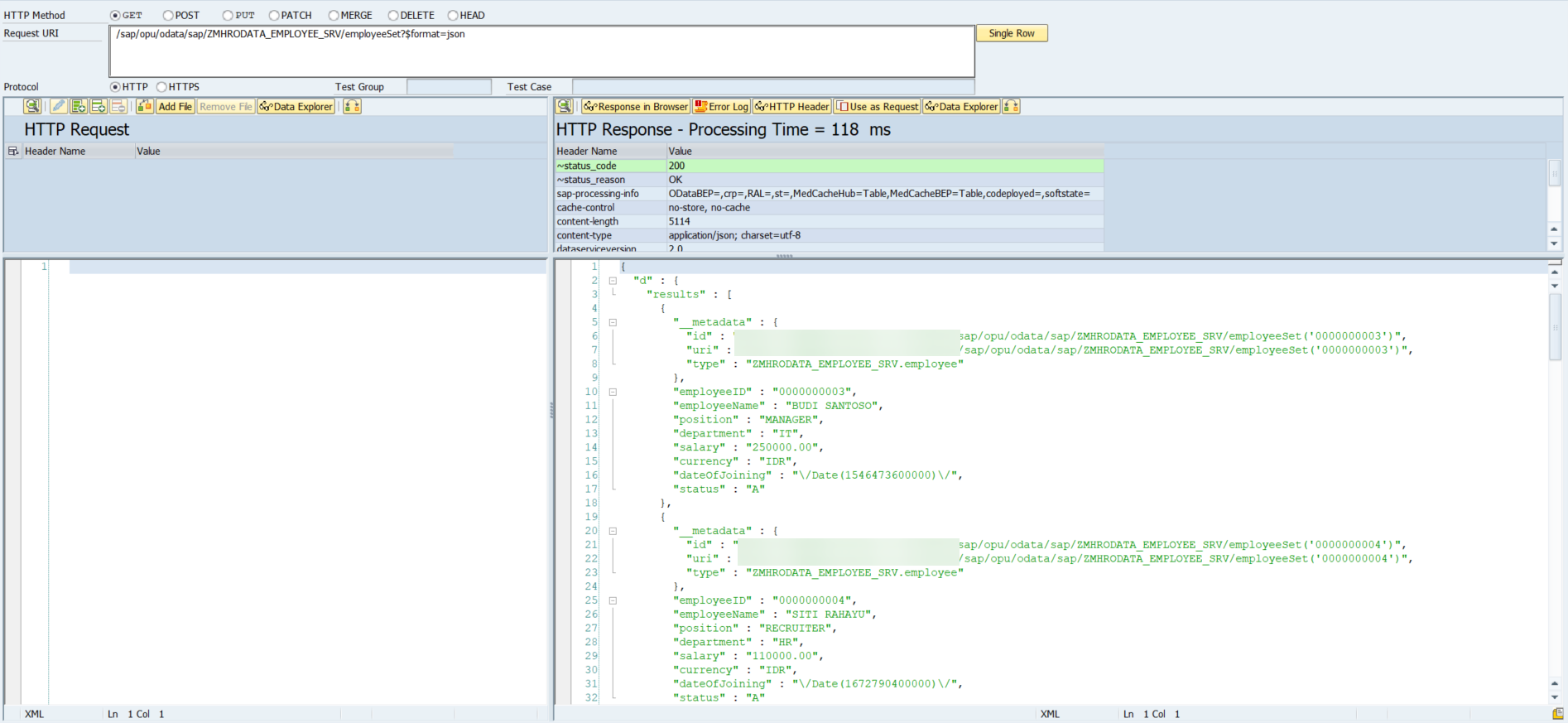
GET /sap/opu/odata/sap/ZMHRODATA_EMPLOYEE_SRV/employeeSet?$format=json — returns all employees in JSON format:
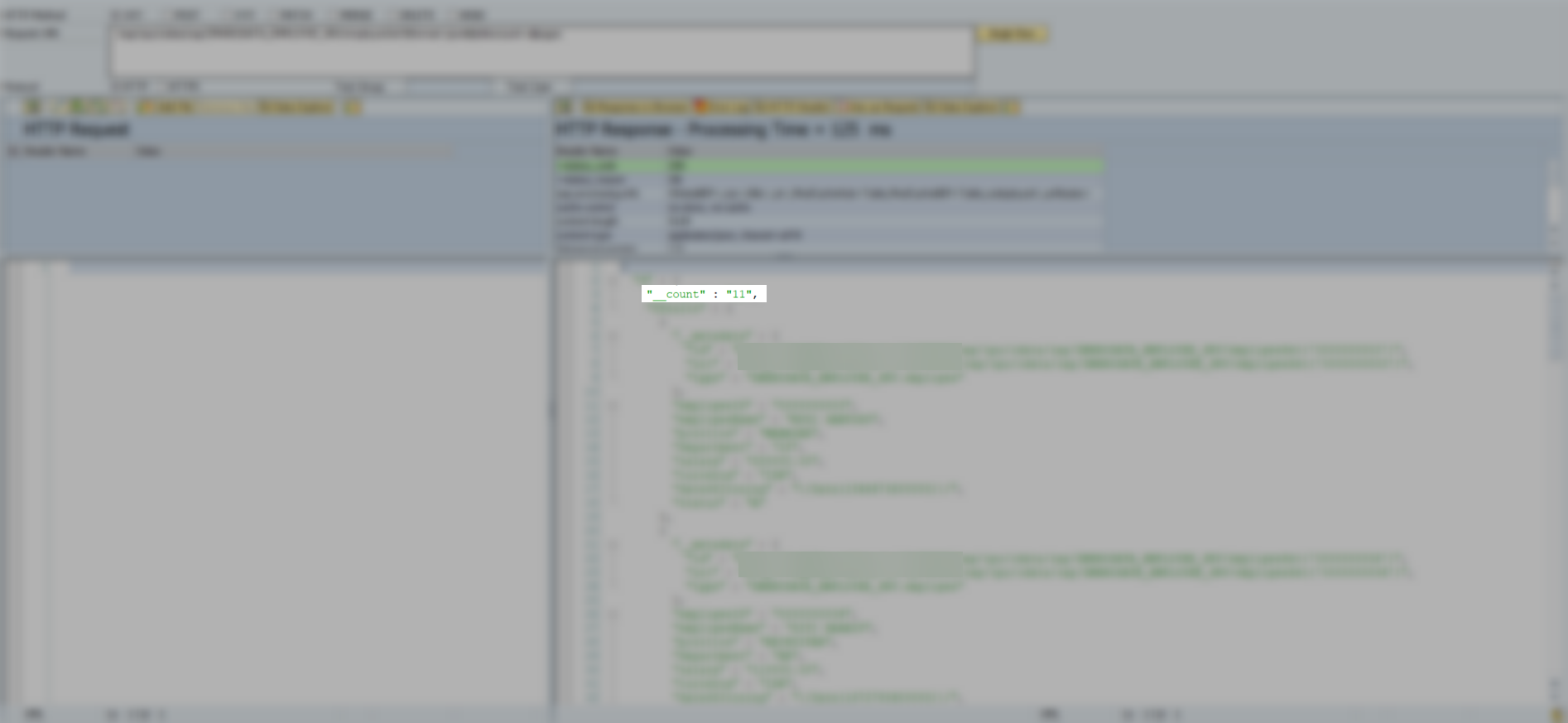
Adding $inlinecount=allpages returns the total record count alongside the results — GET /sap/opu/odata/sap/ZMHRODATA_EMPLOYEE_SRV/employeeSet?$inlinecount=allpages&$format=json:
You can also combine $filter with $inlinecount — for example, filtering employees from the IT department who joined on or after January 1, 2021:
GET /sap/opu/odata/sap/ZMHRODATA_EMPLOYEE_SRV/employeeSet?$inlinecount=allpages&$format=json&$filter=department eq 'IT' and dateOfJoining ge datetime'2021-01-01T00:00:00'
Get Entity
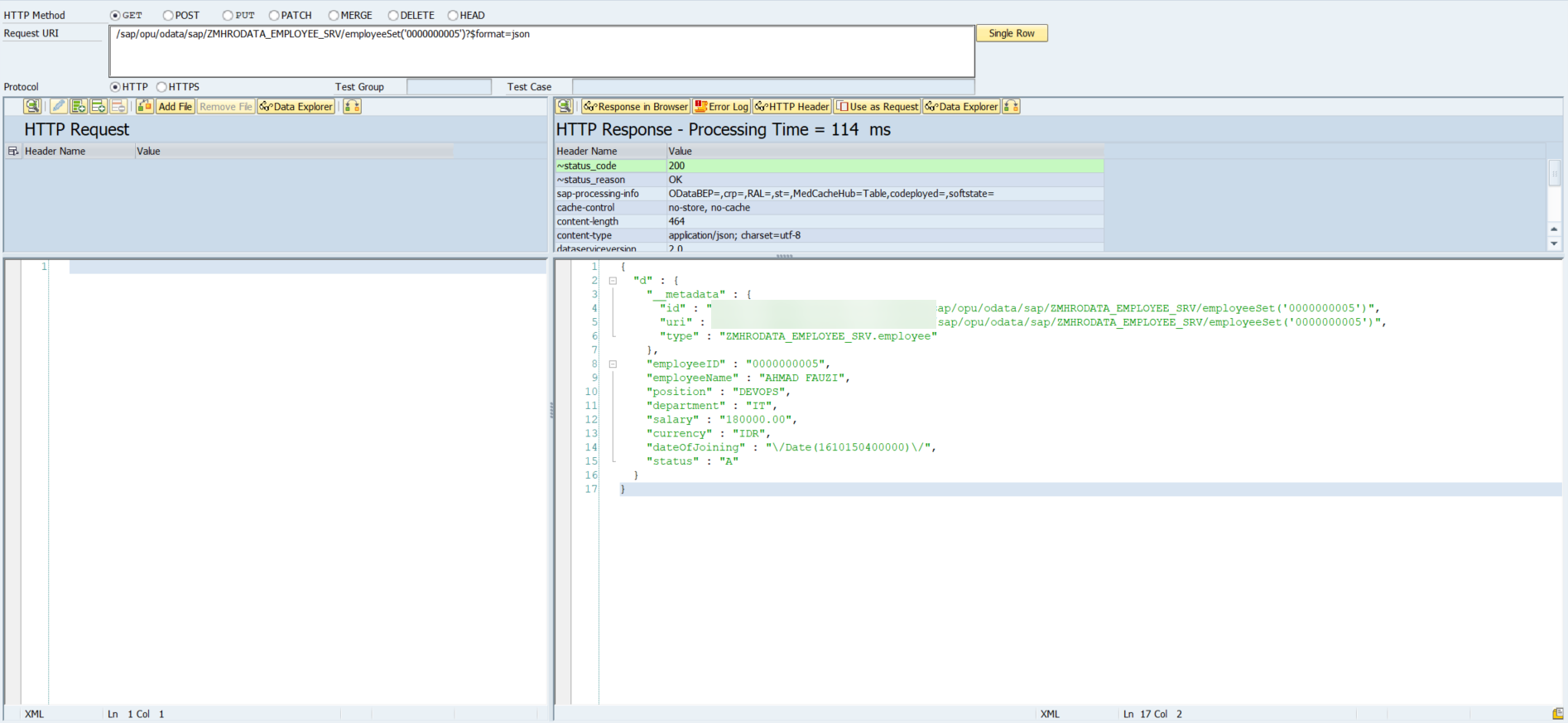
GET /sap/opu/odata/sap/ZMHRODATA_EMPLOYEE_SRV/employeeSet('0000000005')?$format=json — fetch a single employee by ID:
Create Entity
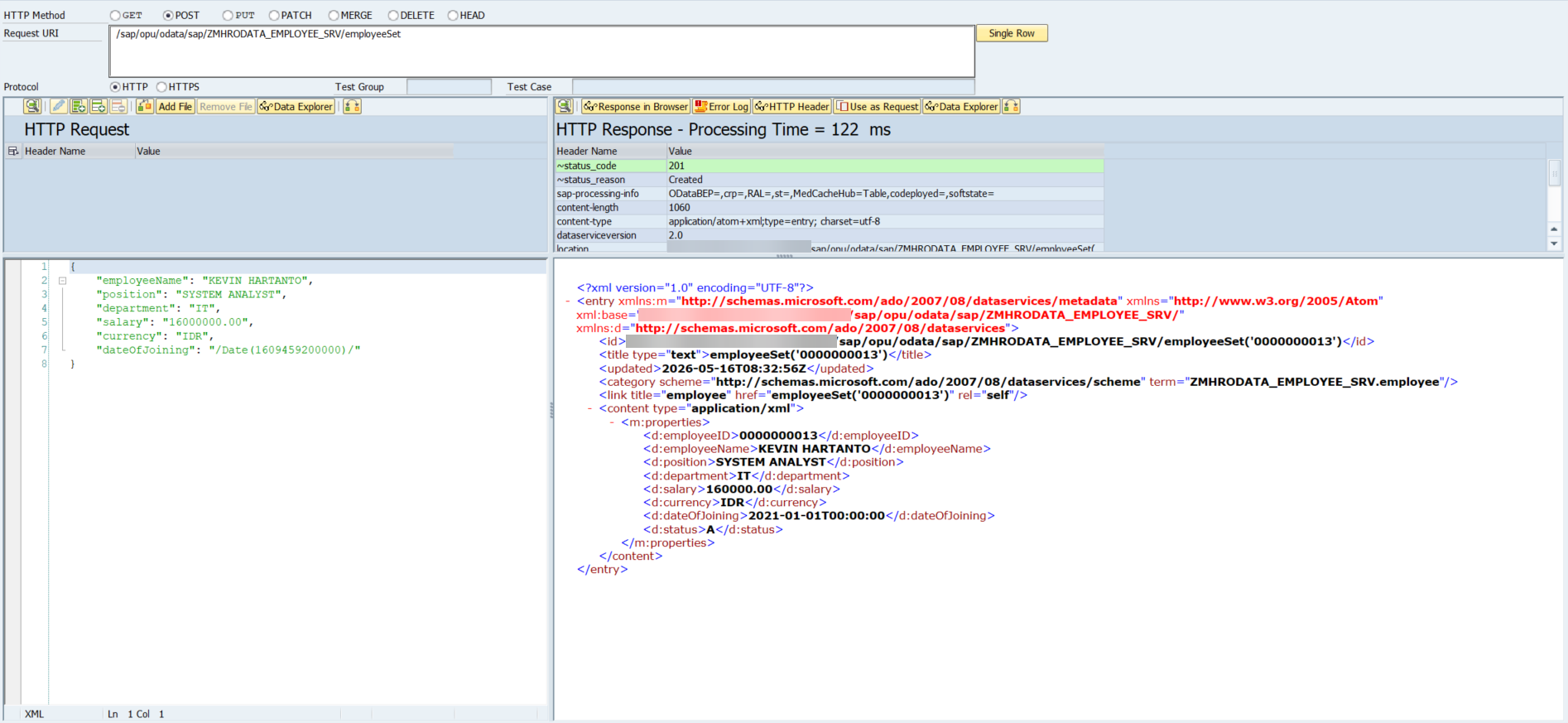
POST /sap/opu/odata/sap/ZMHRODATA_EMPLOYEE_SRV/employeeSet — the request body contains the new employee data, and the response returns HTTP 201 Created with the inserted record including the auto-generated employeeID:
Update Entity
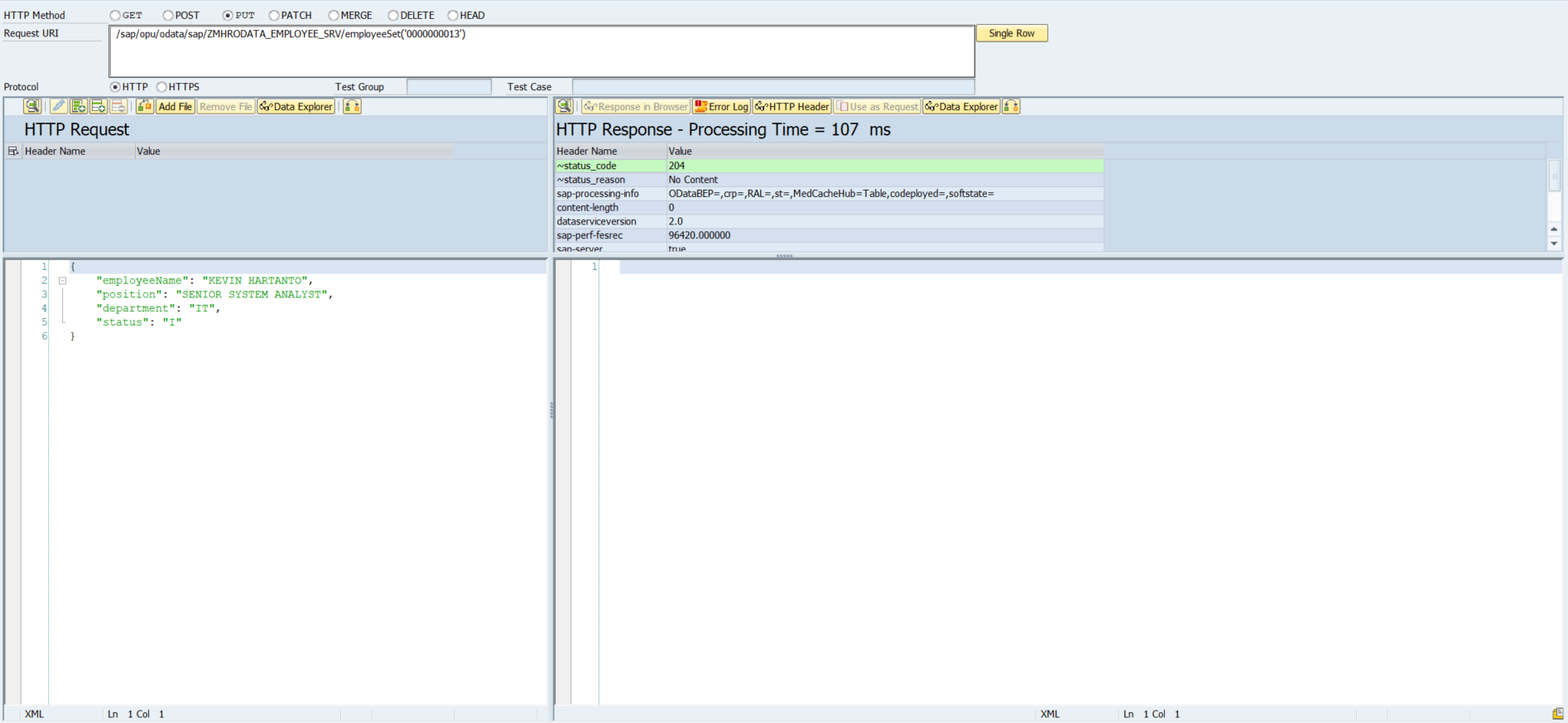
PUT /sap/opu/odata/sap/ZMHRODATA_EMPLOYEE_SRV/employeeSet('0000000013') — the response returns HTTP 204 No Content, meaning the update was successful but no body is returned:
Delete Entity
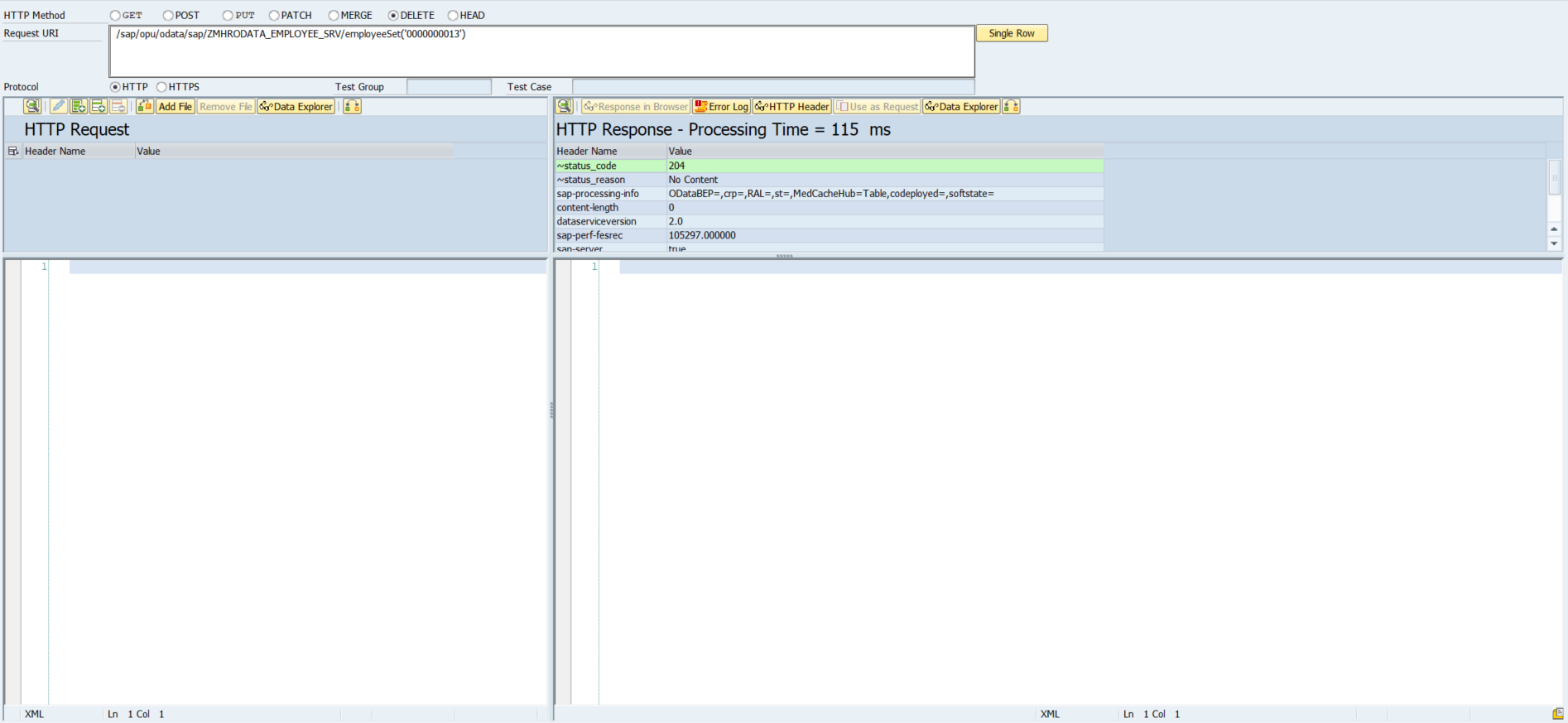
DELETE /sap/opu/odata/sap/ZMHRODATA_EMPLOYEE_SRV/employeeSet('0000000013') — also returns HTTP 204 No Content on success, with an empty response body:
Testing via Postman
For a more realistic testing experience, Postman gives you full control over headers, body, and authentication.
Authentication — use Basic Auth with your SAP credentials:
Username: <your SAP user>
Password: <your SAP password>
CSRF Token — required for all write operations (POST, PUT, DELETE). The process is two steps:
Step 1 — fetch the token via GET:
GET {{BASE_URL}}/sap/opu/odata/sap/ZMHRODATA_EMPLOYEE_SRV/employeeSet
Headers:
  x-csrf-token: fetch
Step 2 — use the token in your write request:
POST {{BASE_URL}}/sap/opu/odata/sap/ZMHRODATA_EMPLOYEE_SRV/employeeSet
Headers:
  x-csrf-token : <token from step 1>
  Content-Type : application/json
  Accept       : application/json
The CSRF token is tied to your session cookie. Make sure both the fetch request and the write request use the same session.
Debugging Failed Requests
| Tool | Purpose |
|---|---|
/IWFND/ERROR_LOG | View detailed OData error logs on the gateway |
/IWFND/GW_CLIENT | Test requests directly from SAP |
/IWBEP/REG_SERVICE | Verify service is registered on the backend |
SE24 + External Breakpoint | Debug ABAP code execution in DPC_EXT |
When a request fails, always check /IWFND/ERROR_LOG first — it gives you the full error context including the ABAP exception that was raised.
7. Conclusion
In this guide, we built a fully functional SAP OData CRUD service from scratch — starting from a custom Z-table in SE11, setting up the service in SEGW, and implementing all five operations in DPC_EXT.
Here’s a quick summary of all the endpoints we built:
| Method | Endpoint | Description |
|---|---|---|
GET | /employeeSet | Fetch all employees |
GET | /employeeSet('0000000001') | Fetch single employee |
POST | /employeeSet | Create new employee |
PUT | /employeeSet('0000000001') | Update employee |
DELETE | /employeeSet('0000000001') | Delete employee |
And the query options supported on GET /employeeSet:
| Query Option | Example |
|---|---|
$filter | $filter=department eq 'IT' |
$orderby | $orderby=employeeName desc |
$top & $skip | $top=10&$skip=0 |
$inlinecount | $inlinecount=allpages |
$format | $format=json |
OData has a lot more depth to it, but the fundamentals you’ve built here apply to everything else. Good luck!