
Building a Reusable API Validation Class in ABAP
Inspired by go-playground/validator
github.com/go-playground/validator →
1. The Problem: Unstructured API Validation in ABAP
Anyone who has worked with APIs in the SAP ecosystem — whether OData, REST via HTTP handler, or RFC exposed to external systems — has likely faced the same problem: scattered, inconsistent request validation.
Imagine a typical API handler. Inside, you find something like this:
" Manual validation scattered everywhere
IF lv_email IS INITIAL.
  lv_error = 'Email is required'.
  RETURN.
ENDIF.

IF lv_email NS '@'.
  lv_error = 'Email format is invalid'.
  RETURN.
ENDIF.

IF strlen( lv_username ) < 3.
  lv_error = 'Username too short'.
  RETURN.
ENDIF.

" ...and so on for every field
This pattern has several serious problems:
- Not reusable — the same logic is rewritten in every handler
- Hard to maintain — when validation rules change, you have to hunt them down across the entire codebase
- Fail-fast only — the user only sees one error at a time, not all errors at once
- No standard — every developer writes validation in their own style
2. Inspiration from Golang: go-playground/validator
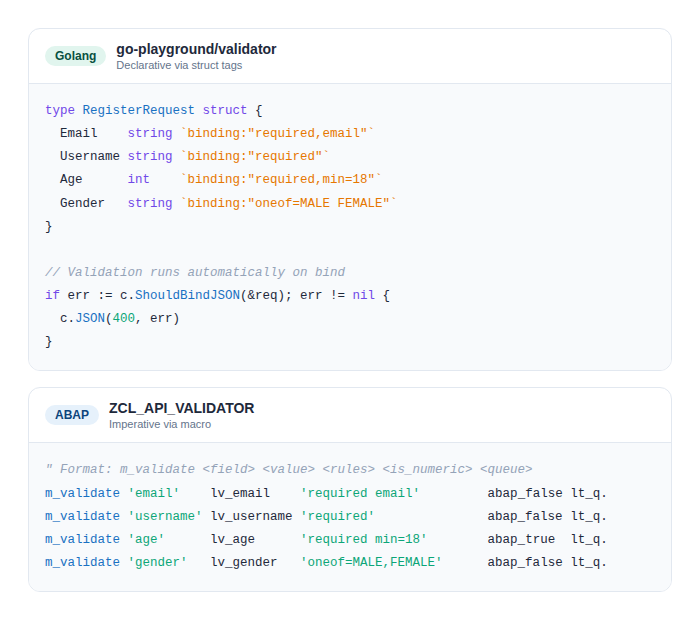
In the Golang world, this problem has long been solved elegantly using the go-playground/validator library. Validation rules are declared directly on the struct definition via struct tags:
type AccountRegisterRequest struct {
    Email        string `json:"email" binding:"required,email"`
    BusinessName string `json:"businessName" binding:"required"`
    Name         string `json:"name" binding:"required"`
}
What makes this pattern powerful is its declarative nature: validation lives alongside the data itself. Anyone reading this struct immediately knows the rules without having to trace validation logic elsewhere.
ABAP does not have struct tags, of course. But the spirit can be adapted: rule-based, readable in a single line, and reusable across the entire codebase.
3. The Solution: ZCL_API_VALIDATOR
The solution is a class called ZCL_API_VALIDATOR that adapts this philosophy into the ABAP paradigm. There are three main components to understand.
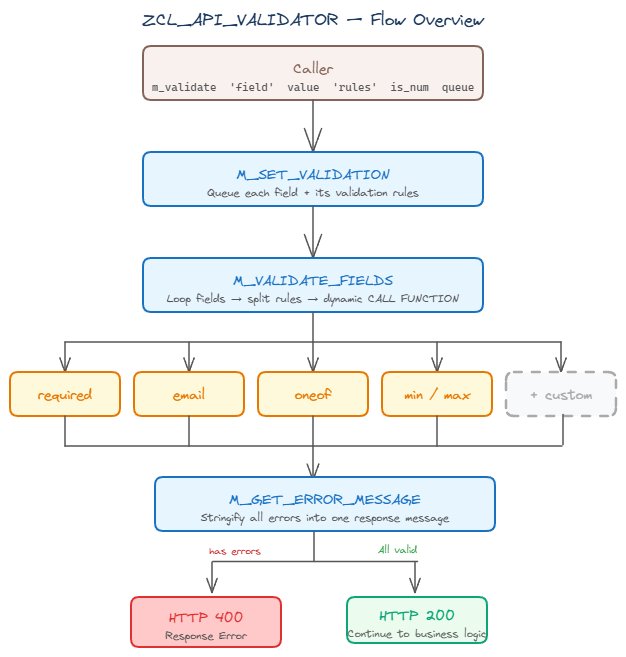
Before diving into the details, here is a high-level overview of how the class works:
3.1 Validator Registry
The heart of this class is a validator registry — an internal table that maps rule names to the Function Modules responsible for executing them. The registry is populated once when the class is first loaded:
" Registry populated in the class constructor
" Format: rule name → Function Module name
vlkey = 'required'  →  ZFM_VALIDATE_REQUIRED
vlkey = 'email'     →  ZFM_VALIDATE_EMAIL
vlkey = 'oneof'     →  ZFM_VALIDATE_ONEOF
vlkey = 'min'       →  ZFM_VALIDATE_MIN
vlkey = 'max'       →  ZFM_VALIDATE_MAX
" ...and so on
The advantage of this pattern is clear: to add a new validator, simply register the new rule and create its Function Module. No changes whatsoever to the core class logic. This is the Open/Closed Principle in practice within ABAP.
3.2 Expressive Syntax via MACRO
To make the class as easy and expressive to use as possible, an ABAP MACRO is used as a wrapper. The result is validation that can be written in a single readable line:
" One line = one field with its rules
m_validate 'email'    lv_email    'required email'          abap_false lt_req.
m_validate 'gender'   lv_gender   'oneof=MALE,FEMALE'       abap_false lt_req.
m_validate 'age'      lv_age      'required min=18 max=65'  abap_true  lt_req.
" Format: m_validate <field_name> <value> <rules> <is_numeric> <queue>
The 4th parameter is a numeric flag. When set to abap_true, the min/max/len rules compare the numeric value — not the string length. For example, min=18 on an age field means the value must be at least 18, not that the string must be at least 18 characters long.
3.3 Input and Output Structures
The class uses two main data structures. The input structure holds information about the field to be validated, while the output structure stores the validation result:
" Input: field information to be validated
ZSTRU_FIELD_INPUT:
  FLDNM  TYPE STRING   " field name
  VALUE  TYPE STRING   " field value
  VLDTE  TYPE STRING   " rule string, e.g. 'required email'
  ISNUM  TYPE CHAR1    " flag: numeric comparison or string length?

" Output: validation result per field
ZSTRU_VALIDATION_RESULT:
  FLDNM  TYPE STRING   " field name
  MESSG  TYPE STRING   " error message or 'valid'
  VNRES  TYPE CHAR1    " 'S' = success, 'E' = error
4. How It Works Under the Hood
When the validation method is called, it processes the field queue one by one. Several key mechanisms make this work reliably.
4.1 Each Field Can Have Multiple Rules
A rule string like 'required email' is automatically split into two separate rules: 'required' and 'email'. Both are executed in sequence for the same field. This allows flexible rule combinations without writing any additional code.
4.2 Optional Fields Are Skipped When Empty
There is an important gate check before validation starts: if a field does not have the 'required' rule and its value is empty, the field is immediately considered valid and skipped. This prevents validators like 'email' or 'min' from returning errors on fields that are intentionally left blank.
" How the logic works:
" Field 'nickname' with rule 'min=3' and empty value
"   → not required, value empty → immediately valid, skip

" Field 'email' with rule 'required email' and empty value
"   → required rule present → enters validation → error: field required
4.3 Dynamic Dispatch to the Right Validator
Once a rule is found in the registry, its Function Module is called dynamically. There is no long IF-ELSEIF chain here — each validator is an independent unit called through the registry. This is exactly why adding a new validator requires no changes to the core logic.
5. The Three Public Methods
This class exposes three public methods that work in sequence. Understanding all three is the key to using the class effectively.
5.1 M_SET_VALIDATION — Register a Field to the Queue
This method registers a single field along with its validation rules into the queue. Each call adds one new entry — no validation is executed at this point.
" Parameters:
" I_FLDNM → field name (used in error messages)
" I_VALUE → field value to be validated
" I_VLDTE → rule string, e.g. 'required email'
" I_ISNUM → numeric flag (default: false)
" CT_FVLD → validation queue (appended to, not replaced)

" Direct call example:
lo_validator->m_set_validation(
  EXPORTING
    i_fldnm = 'email'
    i_value = lv_email
    i_vldte = 'required email'
    i_isnum = abap_false
  CHANGING
    ct_fvld = lt_field_queue
).
5.2 M_VALIDATE_FIELDS — Execute All Validations
This is the core of the class. It takes the entire field queue, runs all rules for every field, and returns a table of validation results.
" Parameters:
" IT_FLDREQ → the registered field queue
" RT_VLTRES → validation result table (one row per field)

lt_results = lo_validator->m_validate_fields( lt_field_queue ).

" Result structure per field:
" FLDNM → field name
" VNRES → 'S' (success) or 'E' (error)
" MESSG → 'valid' or error description
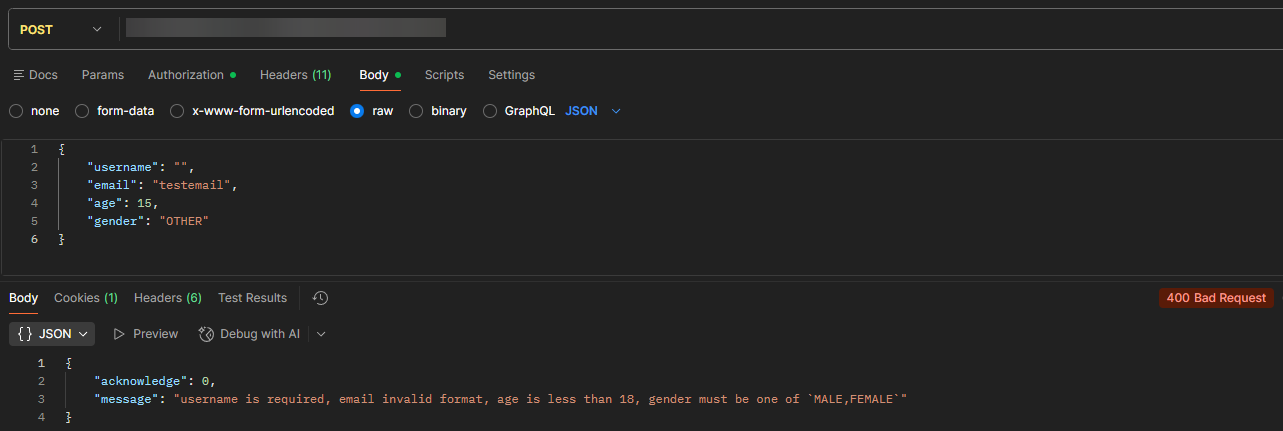
This method processes all fields at once and collects all errors — it does not stop at the first one. If three fields are invalid, the client receives all three error messages in a single response.
5.3 M_GET_ERROR_MESSAGE — Retrieve the Error String
A utility method that converts the validation result table into a single error string ready to send to the client. If all fields are valid, this method returns an empty string.
" Parameters:
" IT_RES  → result table from M_VALIDATE_FIELDS
" RET_MSG → combined string of all error messages

lv_errors = lo_validator->m_get_error_message( lt_results ).

" Example output when two errors exist:
" 'email is required, username must not contain special characters'

" If all valid → lv_errors is empty (IS INITIAL)
The usage pattern is always the same: check whether the result string is empty or not. If not empty, return an error to the client immediately with that message.
6. Real-World Usage Example
Here is a complete example of using this class inside an API handler for a user registration endpoint:
METHOD handle_user_registration.
  DATA: lo_validator   TYPE REF TO zcl_api_validator,
        lt_field_queue TYPE ztab_field_input,
        lt_results     TYPE ztab_validation_result,
        lv_errors      TYPE string.

  " Instantiate the validator
  CREATE OBJECT lo_validator.
  o_validator = lo_validator.

  " ── Register fields for validation ──
  m_validate 'username' lv_req-data-username 'required nospecialchar'  abap_false lt_field_queue.
  m_validate 'email'    lv_req-data-email    'required email'           abap_false lt_field_queue.
  m_validate 'age'      lv_req-data-age      'required min=18 max=60'   abap_true  lt_field_queue.
  m_validate 'gender'   lv_req-data-gender   'oneof=MALE,FEMALE'        abap_false lt_field_queue.

  " ── Run all validations at once ──
  lt_results = lo_validator->m_validate_fields( lt_field_queue ).

  " ── Check for errors ──
  lv_errors = lo_validator->m_get_error_message( lt_results ).

  IF lv_errors IS NOT INITIAL.
    " Return HTTP 400 with all error messages
    RETURN.
  ENDIF.

  " Continue to business logic...
ENDMETHOD.
Notice how multiple rules can be combined on a single field — for example, age is simultaneously required, at least 18, and at most 60. All validations are collected first, then executed at once, so the client receives all error messages in a single response.
7. Available Rules
Here are some of the available validators:
| Rule | Example | Description |
|---|---|---|
| required | 'required' | Field must not be empty |
'email' | Value must be a valid email format | |
| oneof | 'oneof=A,B,C' | Value must be one of the specified options |
| min | 'min=8' | Minimum value (numeric) or minimum string length |
| max | 'max=24' | Maximum value (numeric) or maximum string length |
| len | 'len=10' | String length must be exactly N characters |
| nospecialchar | 'nospecialchar' | Value must not contain special characters |
Rules can be combined in a single string separated by spaces:
" Combining multiple rules on one field
m_validate 'username' lv_username 'required nospecialchar'  abap_false lt_req.
m_validate 'bio'      lv_bio      'max=200'                 abap_false lt_req.
m_validate 'age'      lv_age      'required min=18 max=65'  abap_true  lt_req.
8. Adding a New Validator
One of the greatest strengths of this design is how easy it is to extend. Adding a new validator requires only two steps:
Step 1: Register the new rule in the registry
" Add one entry in the class constructor
APPEND VALUE zstru_validator_key(
  vlkey = 'mynewrule'
  fmnam = 'ZFM_VALIDATE_MYNEWRULE'
) TO validator_registry.
Step 2: Create a Function Module following the same contract
FUNCTION ZFM_VALIDATE_MYNEWRULE.
" Required interface:
"   IMPORTING: field info (name + value + rule string + numeric flag)
"   EXPORTING: validation result (field name + message + status S/E)
"   EXCEPTIONS: INVALID_PARAMETER (if rule format is incorrect)

  " Add your validation logic here
  " If valid   → set status = 'S', message = 'valid'
  " If invalid → set status = 'E', message = error description

ENDFUNCTION.
No changes are required to ZCL_API_VALIDATOR itself. This is the beauty of the registry pattern: the core class does not need to know anything about the new validator being added.
9. Conclusion
ZCL_API_VALIDATOR brings modern validation patterns into the ABAP ecosystem with several solid design decisions:
- Registry pattern keeps the class extensible without touching core logic
- One line per field makes validation code easy to read and review
- Collect-all-errors gives the API client complete feedback in a single response
- The numeric flag lets a single validator handle two modes without duplication
This approach will feel familiar to developers who have worked with Golang, Laravel, or other modern frameworks — which is exactly where the inspiration came from. And that is the added value: bringing a proven pattern into the ABAP ecosystem that has long lacked a standard like this.